
Changelog
Stay up to date with the latest improvements, fixes, and updates for CLI Manager.
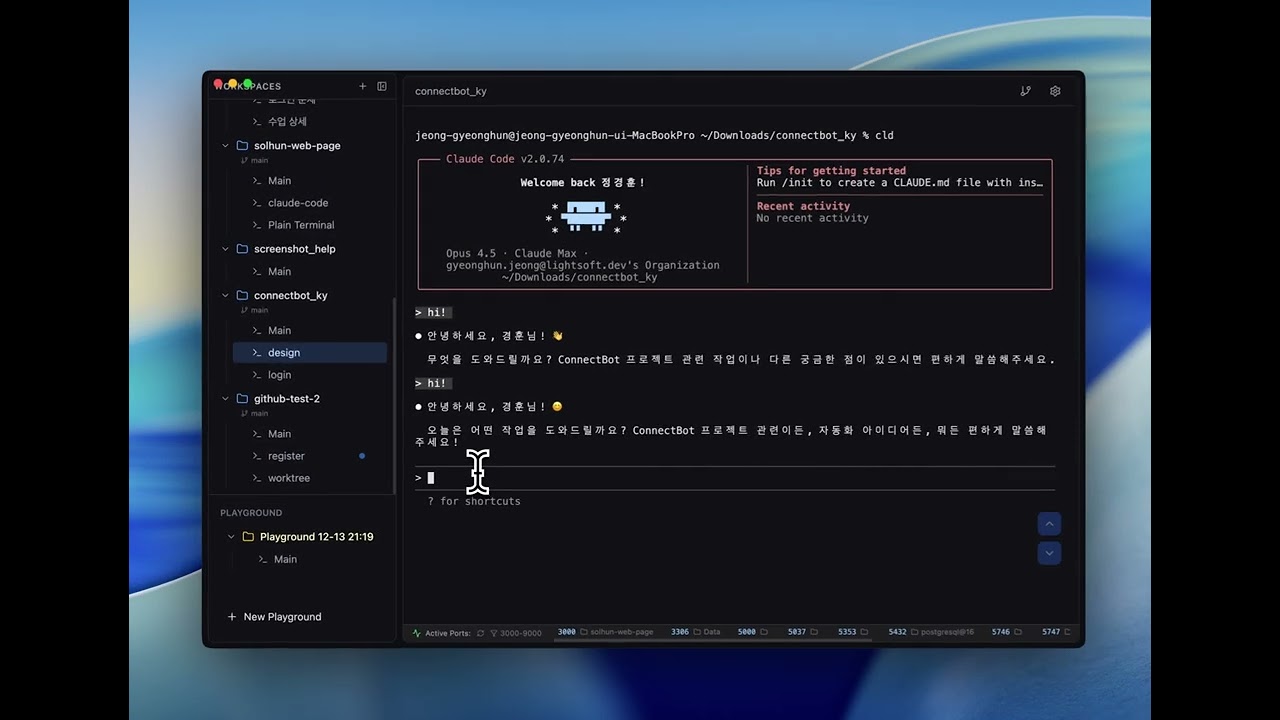
Claude Code Session Monitoring
Real-time session status monitoring inspired by claude-squad. Track Claude Code sessions with visual indicators in the sidebar.
Sidebar Folder Ordering & Steadier AI Sessions
Drag sidebar folders into any order, and the AI Control API can now read session memos. Several cases where input from an AI-driven session got lost are fixed.
- Drag sidebar folders into any order (kept across restarts)
- The AI Control API can read a session's memo (read-only)
- Screen reads now report Claude Code's dimmed next-prompt suggestion separately, so it is not mistaken for typed input
Session Resume & Focus Fixes
Agent sessions opened from a template or shell alias continue the same conversation after a restart, and the AI no longer takes your keyboard when it shows a session.
- Sessions started from a shell alias (e.g. cldy) are tracked too, and resume with the original command after a restart
- Templates with a setup command in front (e.g. glm-on && cldy) are recognized
AI Control API
An AI can now open terminal sessions inside CLI Manager, run templates, send prompts and read the results. It does not run somewhere hidden — these are ordinary terminals in the app, so you can watch and step in at any time.
- Turn on the AI Control API in Settings > Agents and run the copied Claude Code (MCP) command once to connect. It also works over plain REST, without MCP
- Sessions opened by an AI are shown in green in the sidebar with an "AI connected" badge in the header
- Right-click a session > Disconnect AI to take it back at any time. The session keeps running; only the AI loses access
- The AI can only read and type into sessions it opened. Terminals you opened yourself are off-limits
- Off by default · 127.0.0.1 only · token required · Host/Origin checks
Worktree Toggle & Link Fixes
Fixes Reload Worktrees wiping terminal history and Codex links that would not open. Worktrees and terminal file links can now be turned off in Settings.
- Hide worktrees — turn them off in Settings > Git and the sidebar worktrees and related menus disappear; the startup worktree scan is skipped too
- Terminal file links can be switched off entirely in Settings > Editor
- File paths now open in the editor only on ⌘-click, so clicking in the terminal no longer hands focus to the editor
Official Agent Hooks
Session status now comes from events Claude Code and Codex report themselves, instead of guessing from terminal output. Usage-limit meters and in-app diff review ship alongside.
- Hook-based status detection — waiting for approval is told apart from "done", with an amber marker and a desktop notification
- Works for the tab you are looking at too (the old method only detected inactive tabs)
- Existing statusLine and notify settings are chained, not deleted, and restored when you turn the integration off
- Usage meters — Claude Code 5-hour and weekly limits and the Codex weekly limit, exactly as the provider reports them
- Per-tool threshold alerts (80% by default) warn you before you hit a limit
- Diff review — review an agent's changes from the header button, select lines and send comments with file and line numbers to the terminal
- Worktrees are compared against their fork point, so uncommitted changes and new files show up
Loop Dashboard
A dedicated window to monitor and manage Claude Code /loop sessions per project — track iteration counts, status, and timing at a glance, without the extra cost of claude -p.
- New Loop Dashboard window — promote any workspace and watch its /loop run in a separate window
- Per-loop stats modal: iteration timeline, average interval, uptime, and last output preview
- Real-time iteration count, last-loop time, and running/ready/stopped status indicators
- Manual restart with --resume to continue a stopped loop
- Configurable loop-count detection (count mode, debounce, stopped-after threshold)
Scrollback Protection
Major terminal pipeline fixes for CLI tools like Claude Code and Codex. Conversation history is no longer destroyed by screen repaints, and running many terminals no longer pollutes your scrollback.
- Upgraded to xterm 6.0 — screen clears now preserve content in scrollback instead of destroying it
- Hidden terminals defer resize until visible, eliminating repaint storms across sessions
- Terminal output batching for smoother rendering with many sessions
- New automated regression test suite for the terminal pipeline
Open Source Release
CLI Manager is now free and open source under the MIT license.
- The paid license system is gone — no limits on workspaces, sessions, worktrees or templates
- Source code, README and contributing guide published on GitHub
Memo Shortcut
Quick memo toggle with Cmd+J. Open memo, jot notes, close and focus returns to terminal instantly.
- Session memo keyboard shortcut (Cmd+J)
- Auto-focus textarea on open, cursor at end
- Focus returns to terminal on close
Session Memo
Quick notepad for each terminal session. Jot down notes, commands, or reminders right next to your terminal.
- Added per-session memo notepad with auto-save
- Memo indicator shows on toggle button when notes exist
- Cursor position preserved at end of text when reopening
Sidebar Pin & Folder Grouping
Organize your workspaces with pin-to-top and folder grouping. Pin frequently used workspaces to the top of the sidebar, and group related projects into collapsible folders for a cleaner workspace.
- Pin workspaces to top of sidebar via right-click context menu
- Create folders to group related workspaces together
- Collapse/expand folders to hide unused projects
- Move workspaces between folders via context menu
- Rename and delete folders with right-click
Git Worktree Auto-Sync
Automatically detect and sync git worktrees on app startup. Worktrees created or removed externally are now seamlessly reflected in the workspace list.
- Auto-sync worktree workspaces on app startup via git worktree list
- Reload Worktrees button added to workspace and worktree context menus
- Improved workspace state refresh with refreshWorkspacesFromStore utility
System Monitor
Built-in system resource monitoring with on-demand data fetching
- System Monitor: View CPU, RAM, Disk, Battery, active sessions, and uptime in one click
- On-demand data fetching — no background polling, zero resource overhead
- Color-coded progress bars (blue/yellow/red) for resource usage levels
Session Counts & Git File Menu
See how many sessions each workspace has, and act on files straight from the Git panel.
- Optional session count next to each workspace name (Settings > Appearance, off by default); a parent workspace includes its worktrees
- Right-click a file in the Git panel to open it in your editor or copy its path
- Report Issue button on the empty screen, with a feedback email setting
Session Rename, Git Panel Context Menu & UX Improvements
Quick session renaming, Git panel file actions, and drag-and-drop stability improvements
- Session rename shortcut (⌘R on macOS, Ctrl+R on Windows) with auto terminal focus after rename
- Click port numbers in StatusBar to open localhost URL in browser
- Show session count badge next to workspace names (toggle in Settings > Appearance)
- Git Panel file context menu: right-click files for Open in Editor and Copy Path
Claude Session Restore & Keyboard Shortcuts
Added Claude CLI session restore and customizable keyboard shortcuts
- Claude session auto-restore: Automatically adds --session-id when running claude command
- Resume previous Claude session with --resume on app restart
- Session file validation from ~/.claude/projects/
- Keyboard shortcuts: Cmd+]/[ for tab navigation, Cmd+Shift+]/[ for workspace navigation
- Customizable keyboard shortcuts in Settings
Terminal Management & Template Shortcuts
Improved terminal session management and template shortcut features
- New terminal created with Cmd+T is now auto-selected
- Drag to reorder templates in Settings
- Shortcut numbers displayed next to templates (⌘T+1, ⌘T+2, etc.)
Bug Fix
Terminal scroll fix
Maintenance Release
A re-release of v1.3.1 (terminals start as a login shell, so PATH matches your usual terminal). No other changes.
Terminal PATH Fix
Fixed command not found errors when launching from Finder/Spotlight
Split View & Grid View
New terminal view modes for enhanced productivity
- Split View: Display multiple terminals in a single window with drag & drop support
- Split View: Horizontal/vertical split and grid layouts, up to 4 terminals side by side
- Grid View: Open terminals in a separate window, monitor up to 4 terminals simultaneously
- Grid View: Perfect for multi-monitor setups
Terminal Font Fix & Settings
Bug fix for terminal font settings and default configuration updates
- Enable Claude Code Hooks by default
File Search & Preview
Major update with file search, preview features, and terminal improvements
- Add file search feature (Cmd+Shift+F for filename/content search)
- Add file preview with syntax highlighting (Cmd+Enter)
- Add image file preview support
- Add sidebar terminal preview on hover
- Add terminal context menu for dragging text to Finder or Editor
Improvements and Bug Fixes
Enhanced external link handling and various bug fixes
- Enhanced openExternal IPC handler
- Open in Finder support
Add Cmd+Click support to open file paths from terminal in configured editor
Terminal Link & Drag-Drop Enhancement
- Add Cmd+Click support to open file paths from terminal in configured editor
- Add clickable URL links in terminal (localhost, https, etc.)
Custom Editor Path Fix
Your custom editor setting now sticks.
Scroll Sync After Session Switch
Follow-up to v1.0.34 for switching between sessions.
Terminal Scrollbar Sync Fix
Keeps the terminal scrollbar in step with what you see.
Fix Terminal Freezing Issues
Fix Terminal Freezing Issues
Claude Code Session Monitoring
Real-time session status monitoring inspired by claude-squad. Track Claude Code sessions with visual indicators in the sidebar.
- Add Claude Code session monitoring with Running/Ready status indicators
Add quit confirmation dialog with background mode option
Add quit confirmation dialog with background mode option
- Custom editor command support in Settings
- Add quit confirmation dialog with background mode option