
AI Control API
Let an AI open terminal sessions inside CLI Manager, run your templates, send prompts, wait for them and read the result — in ordinary terminals you can watch and step into. Available since v1.9.0; off by default.
What it does
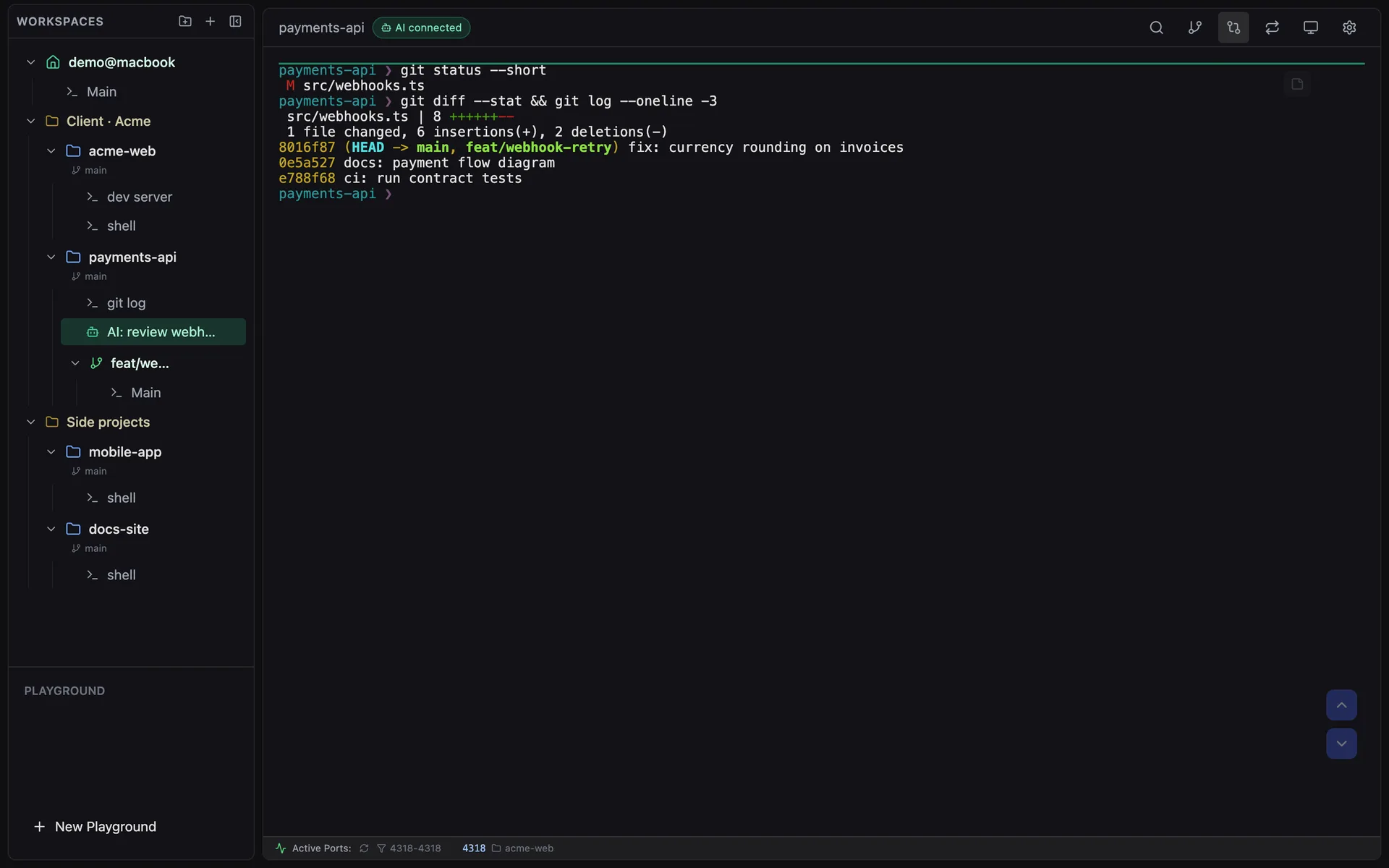
Running an agent headless (claude -p) means nobody sees what it does until it is done. The AI Control API takes the other route: the agent works in a session that appears in your sidebar, in green, with an AI connected badge in the header. You can read along, type into it, or disconnect the AI and keep the session for yourself.
Everything stays on your machine: the server binds to 127.0.0.1, requires a bearer token, and checks the Host and Origin headers so a web page cannot call it behind your back.
Turn it on
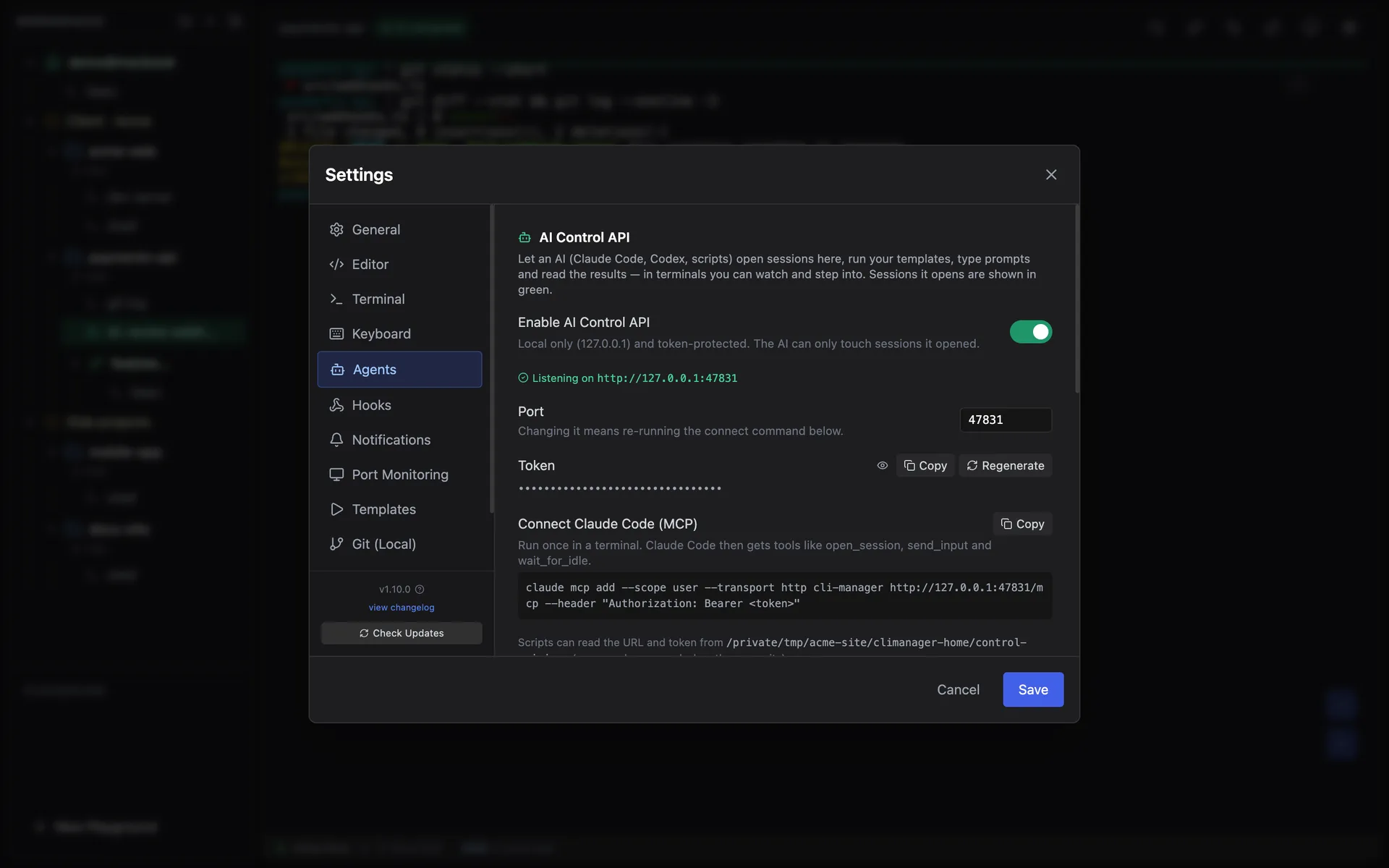
- Open Settings → Agents → AI Control API and switch on Enable AI Control API.
- The panel shows the real state of the server (for example “Listening on http://127.0.0.1:47821”), the token, and a ready-to-copy connect command. The default port is
47821. - While it runs, the app writes
~/.climanager/control-api.json(url,mcpUrl,token,pid; file mode 600) so scripts can find it without copy-paste. The file is deleted when the app quits.
Connect Claude Code (MCP)
Run the command from the settings panel once. It registers CLI Manager as an MCP server for your user:
claude mcp add --scope user --transport http cli-manager http://127.0.0.1:47821/mcp \
  --header "Authorization: Bearer <token>"
Claude Code then gets these tools: list_workspaces, list_templates, list_sessions, open_session, send_input (with optional wait_seconds), wait_for_idle, read_output, focus_session, release_session and close_session. Errors come back as tool results the model can read, and screen output is plain text.
Use it without MCP (REST)
Any script or agent that can make HTTP requests can use the same API. Branch on the HTTP status code, not on the message text:
# Address and token come from the discovery file the app writes while the API is on
URL=$(python3 -c "import json,os;print(json.load(open(os.path.expanduser('~/.climanager/control-api.json')))['url'])")
TOKEN=$(python3 -c "import json,os;print(json.load(open(os.path.expanduser('~/.climanager/control-api.json')))['token'])")
H=(-H "Authorization: Bearer $TOKEN" -H 'Content-Type: application/json')

curl -s "${H[@]}" "$URL/v1/templates"                                   # what can I run?
curl -s "${H[@]}" -d "{\"path\":\"$PWD\",\"template\":\"claude-code\",\"prompt\":\"fix the failing test\"}" \
     "$URL/v1/sessions"                                                 # open (returns session.id)
curl -s "${H[@]}" -d '{"timeoutMs":300000}' "$URL/v1/sessions/$ID/wait"  # wait until it is idle
curl -s "${H[@]}" -d '{"keys":["down","enter"]}' "$URL/v1/sessions/$ID/input"   # answer a question
curl -s "${H[@]}" -X DELETE "$URL/v1/sessions/$ID" # close| Status | Meaning | What to do |
|---|---|---|
409 awaiting_input | A question is on screen (permission prompt, folder trust, menu). | Read the screen, answer with keys — not text. |
403 not_controlled | Not a session the API opened, or the user clicked Disconnect AI. | Stop using that session. |
timedOut: true | The wait ended but the session is still busy. | Not a failure — wait again or report progress. |
Agent skill: climanager-session
climanager-session is an agent skill built on the REST API. It wraps every call in a small, dependency-free Node script (clim.mjs) so an agent can drive CLI Manager without any MCP setup, and it teaches the agent the safety rules below. A typical run:
node clim.mjs doctor                  # is the API on? (run this first)
node clim.mjs templates               # what can I run?

node clim.mjs open ~/code/my-project --template claude-code \
     --name "AI: fix failing test" --prompt "fix the failing test"
node clim.mjs wait last --timeout 300          # wait, then print the screen
node clim.mjs send last "now commit it" --wait 300
node clim.mjs read last --tail --lines 120     # include scrollback
node clim.mjs send last --keys down,enter      # answer a menu with keys
node clim.mjs release last                     # hand it to the user (keeps running)
node clim.mjs close last                       # kill it when you are done
A session can be named by last, the first few characters of its id, or part of its name. The script reads the discovery file (or CLIM_URL and CLIM_TOKEN) and reports the result as an exit code, so the agent never has to parse prose:
| Exit code | Meaning | Next step |
|---|---|---|
| 0 | Success | Continue |
| 3 | The screen is waiting on a question or menu | Read the screen and answer with --keys |
| 4 | Session not found, or the user took it back | Stop using it; open a new one if needed |
| 5 | API off or app not running | Ask the user to enable it in Settings → Agents |
| 7 | Wait timed out — still running | Not a failure; wait again or report |
| 2 | Usage error | Fix the arguments |
Install it into Claude Code, Codex or any agent that reads skills — the source is on GitHub at woorichicken/climanager-session (MIT). Then ask your agent in plain words, for example “open ~/code/api in CLI Manager with Claude Code and have it fix the failing test”.
npx skills add woorichicken/climanager-session@climanager-sessionSession states
| state | Meaning |
|---|---|
starting | The session exists but its terminal has not started yet. |
busy | Output in the last 1.5 s, “esc to interrupt” on screen, or a hook reports a running turn. |
idle | None of the above. |
exited | The terminal process is gone. |
awaitingInput: true— the bottom of the screen shows a question (permission prompt, folder trust, “Enter to confirm · Esc to cancel”), or a hook reported one.suggestion— dim text in an otherwise empty input box, such as Claude Code's next-prompt suggestion. Nobody typed it; don't read it as the user's instruction.memo— the session's memo pad (⌘J), read-only. Added in v1.10.0.
Access and safety rules
| The API can | The API cannot |
|---|---|
| List workspaces and templates | Read or type into sessions you opened yourself |
| Open sessions (and register a new folder as a workspace) | Act on a session after you click Disconnect AI |
| Drive, read, focus, release and close the sessions it opened | Type text while a question is on screen (unless it passes force) |
- Answer questions with keys. Enter picks the highlighted option — on a folder-trust dialog that can be “No, exit”. The API refuses text while a question is showing.
- Trust and permission prompts are your decision. An agent should only accept them when your request was to work in that folder.
- Focus only when asked. Showing a session switches what the app displays and costs you the caret in whatever you were typing in, so
focusis off by default and the window is never raised. - Release instead of close when the result should stay on screen. Close kills the process.
Endpoint reference
All requests need Authorization: Bearer <token>. An optional X-Client-Name labels who owns the session. Errors look like { "error": { "code", "message" } }.
| Method | Path | Body / query |
|---|---|---|
| GET | /v1/health | — |
| GET | /v1/workspaces | ?query= |
| GET | /v1/templates | — |
| GET | /v1/sessions | Sessions under AI control |
| POST | /v1/sessions | path or workspaceId; template or command; name, prompt, focus |
| GET | /v1/sessions/:id | — |
| GET | /v1/sessions/:id/output | ?mode=screen|tail&lines= |
| POST | /v1/sessions/:id/input | text, submit (default true), keys[], force |
| POST | /v1/sessions/:id/wait | timeoutMs (≤ 600000), quietMs, lines |
| POST | /v1/sessions/:id/focus | — |
| POST | /v1/sessions/:id/release | Hands the session to you; the API loses access |
| DELETE | /v1/sessions/:id | Kills the terminal and removes the session |
Keys accepted by input: a single character, or enter escape tab shift-tab backspace space up down left right ctrl-c ctrl-d ctrl-l ctrl-u. Long text is typed before Enter with a delay that grows with its length, because agent TUIs read a fast Enter as part of a paste; if a prompt is left in the input box, the API presses Enter again (up to twice).
MCP lives at POST /mcp (JSON-RPC 2.0, stateless, protocol versions 2024-11-05 to 2025-11-25).
Troubleshooting
| Symptom | Cause | Fix |
|---|---|---|
| Can't connect | The app is closed or the switch is off | Settings → Agents → AI Control API |
terminalStarted: false | The app window is closed (running in the background) | Open the window — sessions are created by it |
promptSent: false | The program is asking something (often folder trust) | Read the screen, answer with keys, then send |
| Port already in use | Another process holds the port | Pick another port in Settings, then re-run the MCP command |
| Setting is missing | App older than v1.9.0 | Update CLI Manager |
The design notes, costs and full contract live in the control-api.md architecture doc on GitHub.